

You’ve been planning a project for weeks. You’ve defined the objectives, your team is aligned, and the client is eager to see results. Then the inevitable happens: midway through execution, someone asks “who’s handling that?” or a deliverable notbody accounted for suddenly appears. The budget spirals, deadlines slip, and stress compounds.
The solution to this problem exists, has a name, and has decades of methodological backing behind it: the work breakdown structure, known by its acronym as WBS (Work Breakdown Structure). This definitive guide will explain what it is, how it works, how to build one from scratch, and how to get the most out of it in your projects. And here’s a hint: once you master it, you won’t be able to imagine working without it.
What Is a Work Breakdown Structure (WBS)?
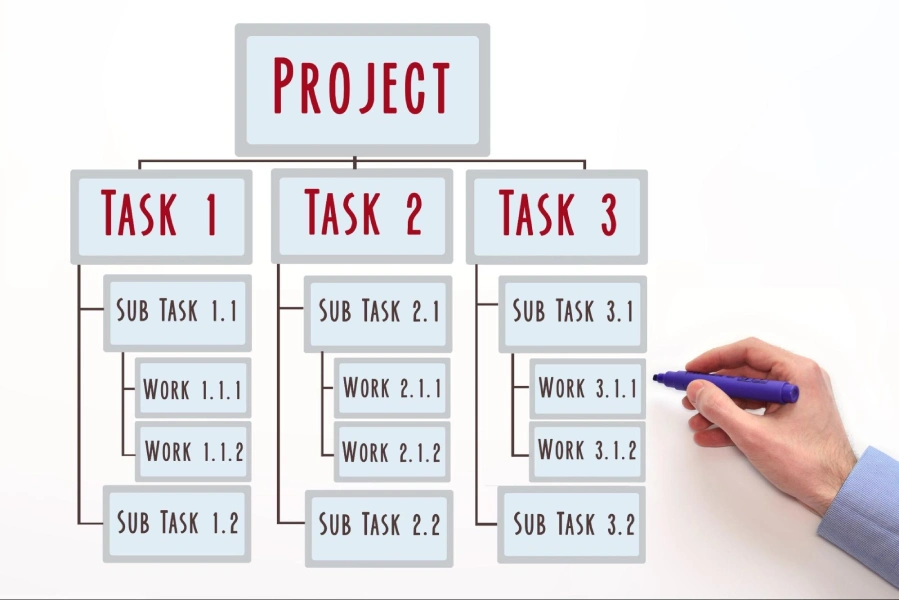
The work breakdown structure is a hierarchical decomposition of the total scope of a project. In simpler terms: it’s a visual tree that breaks down all the work to be done into smaller, manageable, and controllable units, down to the minimum units of work known as work packages.
The internationally recognized reference standard is the Project Management Institute (PMI) Practice Standard for Work Breakdown Structures, which defines the WBS as the starting point for the detailed planning of any serious project.
Imagine you’re building a house. The WBS doesn’t tell you when you’ll pour the foundation or who will do it — it tells you what needs to be built, broken down level by level. Foundation, structure, MEP systems, finishes… each one becomes a branch of the tree, which is in turn subdivided into work packages until each unit is concrete enough to be estimated, assigned, and controlled.
When to Use a WBS?
The WBS is created during the Planning phase of the project life cycle, immediately after the overall scope has been defined and documented. In methodologies like the PMBOK, this occurs right after approval of the Scope Statement.
While it can technically be applied to projects of any size, its value grows exponentially in complex, multidisciplinary, or long-duration projects. In small projects, it may seem like overkill, but even then a basic breakdown prevents misunderstandings and makes it easier to estimate time and costs.
A good rule of thumb: if a project has more than one major deliverable, involves more than two people, or lasts more than two weeks, it’s worth building a WBS. The time you invest upfront pays back many times over during execution.
Why the WBS Is So Important in Projects
The WBS in projects is not a decorative diagram for presentations. It’s the backbone upon which the schedule, budget, resource allocation, and risk management all rest. Here are its key benefits:
- Risk mitigation: By breaking the project down into small pieces, risks become visible before they materialize. It’s far easier to identify potential problems in a specific work package than in a broad, vague deliverable.
- Accurate time and cost estimates: Estimating an entire project as a whole is nearly impossible with precision. Estimating each work package, one by one, is feasible. The sum of precise estimates produces a realistic budget and schedule.
- Clear assignment of responsibilities: Each work package can be assigned to a specific owner. There are no gray areas, no “I thought you were handling that.” This directly ties into the responsibility of the project manager: ensuring that every deliverable has a clear owner.
- Improved stakeholder communication: A well-designed WBS is understandable to anyone, even those without technical training. Showing a client or sponsor how the project is broken down builds trust and makes scope reviews easier.
- Scope creep control: Any change request that isn’t in the WBS is an immediate red flag for potential scope expansion. The WBS acts as a shield against unplanned work.
WBS Levels
The hierarchy of the WBS is its most distinctive feature. Each level represents a greater degree of work detail. Here’s how it’s structured:
Level 1: The Project (Final Objective)
At the top of the tree is the project in its entirety. It is the root node — the complete name of the project. For example: “Mobile E-commerce App Development” or “Q4 2025 Marketing Campaign Launch.” It represents 100% of the scope.
Level 2: Major Phases or Key Deliverables
The second level breaks the project down into its major components or phases. These can be organized by life cycle phases (Initiation, Planning, Execution, Closure) or by major deliverables (Frontend, Backend, Database, in the case of a software project). This is the level most frequently reviewed by stakeholders.
Level 3: Sub-Deliverables
Each Level 2 component is subdivided into sub-deliverables. For example, the “Frontend” deliverable breaks down into “UI Design,” “Main Screen Development,” and “Usability Testing.” Level 3 is where the technical team starts to take ownership.
Level 4: Work Packages
Work Packages Work Packages
Essential Components and Rules of the WBS
Working with the WBS in projects professionally means knowing its fundamental rules, especially those established by the PMI standard. Ignoring them is the difference between a useful WBS and one that becomes a pretty diagram with no real value.
The 100% Rule
This is the golden rule of the WBS: the sum of all work packages must represent 100% of the project scope. No more, no less.
What does this mean in practice? Every task included in the WBS must belong to the project, and every task in the project must be in the WBS. If you add work that wasn’t in the approved scope, you’re inflating the WBS. If you omit real project work, your WBS is incomplete and your planning is flawed.
This rule applies at every level: the sum of Level 3 sub-deliverables must represent 100% of the Level 2 deliverable they belong to. Mastering this concept is a fundamental part of preparing for the PMP certification, one of the most demanding exams in the field.
Work Packages and Tasks
One of the most common mistakes is confusing the WBS with the schedule. The WBS goes down to the work package: the minimum deliverable unit, which can be estimated and assigned. Specific tasks — the concrete actions to complete that package — go into the schedule or work plan.
For example: “Homepage wireframe design” is a valid WBS work package. “Client wireframe review meeting,” “Incorporating feedback in Figma,” or “Sending final designs” are tasks that go into the schedule associated with that package.
The WBS Dictionary: What Exactly Is Included?
This is where many project managers make a critical mistake: they create the visual WBS and stop there. The hierarchical diagram alone is not enough. Its true power emerges when combined with the WBS Dictionary, a document that defines each work package in detail. Without it, the WBS is just an image.
Task (or Work Package) Description
Each package needs a clear and unambiguous description of what it includes and, above all, what it does no include. This precise boundary is what prevents scope disputes and the notorious scope creep.
Task Owner (Assignment)
Each work package must have a single owner (even if multiple people carry out the work), who will be accountable for its delivery. Without a single owner, no one is truly responsible for anything.
Task Budget and Resources
The dictionary includes the cost estimate for the package and the required resources: people, equipment, materials, software licenses, etc. This information is the foundation for building the project’s overall budget using a bottom-up approach.
Start and End Dates
While the schedule sets the exact dates, the dictionary may include estimated time windows or relevant dependencies for each package. This facilitates coordination between teams when the WBS is created in parallel with the project plan.
Task Status and Acceptance Criteria
El status (pending, in progress, completed, blocked) allows the dictionary to be used as a tracking tool during execution. The acceptance criteria specify what conditions the deliverable must meet to be considered complete and approved. Without clear criteria, every review turns into a negotiation.
Types of Work Breakdown Structure
There is no single way to organize a WBS. Depending on the nature of the project and the team’s preferences, one of two main approaches can be used:
Phase-Based WBS (Life Cycle): In this approach, Level 2 corresponds to the project life cycle phases: Initiation, Planning, Execution, Monitoring, and Closure. This is the most common model in traditional or waterfall projects, where stages are sequential and clearly differentiated. It facilitates stage-by-stage control and milestone management.
Deliverable-Based WBS (Final Products): Here, Level 2 corresponds to the major deliverables of the project, regardless of when they are produced. It is more common in engineering, construction, or product development projects. It facilitates the client’s perspective, who better understands the project in terms of what they will receive rather than the internal steps to produce it.
In practice, many projects combine both approaches: phases at Level 2 and deliverables at Levels 3 and 4.
How to Create a Project WBS Step by Step
One of the most frequently asked questions in project manager training is precisely how to create a project WBS in a structured way. The good news is that the process, while requiring rigor, follows clear and repeatable steps.
- Review and sign the Scope Statement: Before opening any software or drawing any diagram, you need a clear picture of what the project includes and excludes. Project scope definition is the indispensable starting point. Without a defined and approved scope, your WBS is built on sand.
- Identify the major deliverables: Meet with key stakeholders and the team to identify the major work blocks. Ask: What are the specific products, services, or outcomes this project must produce? These will become your Level 2.
- Decompose into successive levels: Take each Level 2 deliverable and break it into smaller components (Level 3). Repeat the process until you reach Work Packages: estimable, assignable, and controllable units of work. Always apply the 100% Rule at each level.
- Assign WBS Codes: Each WBS element receives a unique identifier (1.0, 1.1, 1.1.1, etc.). This facilitates traceability, cross-referencing with the schedule, and unambiguous communication across the team.
- Develop the WBS Dictionary: For each work package, document the description, owner, resources, costs, acceptance criteria, and any relevant dependencies. This step transforms the WBS from a diagram into a real management tool.
- Review and validate with the team and stakeholders: Present the WBS and request feedback. The goal is to confirm that 100% of the scope is represented, that there is no duplicated work, and that all owners understand and accept their packages.
Best Practices for Creating a Work Breakdown Structure
Knowing the theory is only the first step. Here are the tips that make the difference between a theoretical WBS and one that actually works day to day:
- Apply the 8/80-hour rule: Los Work Packagesshould have an estimated effort of between 8 and 80 work hours. Under 8 hours suggests unnecessary detail that micromanages the team. Over 80 hours indicates that the package is too large to be controlled with precision and should be decomposed.
- Involve the team in its creation: The WBS should not be designed by the project manager alone. The people who will do the work are the ones who best know how to decompose it precisely. Involving them also increases their commitment to deadlines and scope.
- Focus on deliverables, not activities: Every node of the WBS should represent a deliverable (something that can be seen, reviewed, and approved), not an activity (something that is done). Incorrect: ‘Meet with the client.’ Correct: ‘Requirements report approved by the client.’
- Keep it alive: The WBS is not a static document. When scope changes are approved through the change control process, the WBS and its dictionary must be updated. An outdated WBS gives a false sense of control.
- Use the right tools: From diagrams in PowerPoint or Visio, to specialized software like WBS Schedule Pro, or simply Excel. What matters isn’t the tool, but the rigor of the process.
WBS Examples: Real-World Case Studies
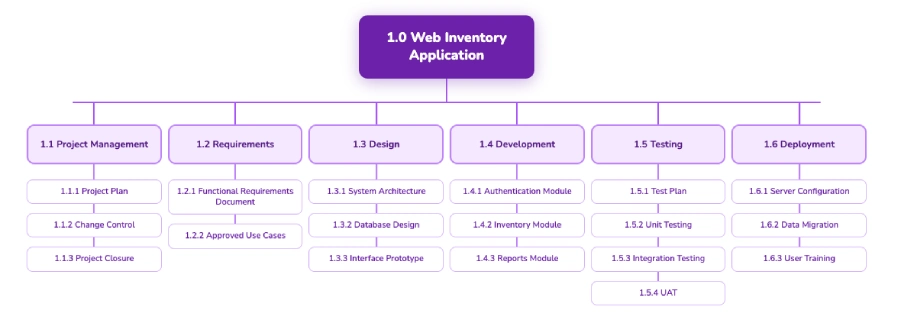
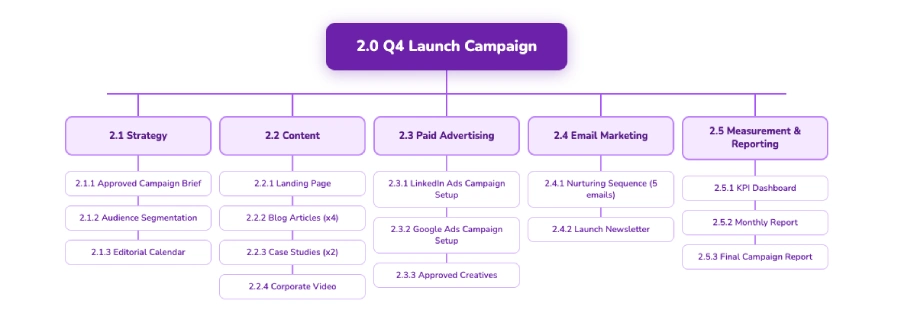
To bring the concept to life, let’s look at two WBS examples applied to very different sectors. This demonstrates the versatility of the tool and how to adapt its structure to the nature of the project.
WBS Example 1: Software Development Project
WBS Example 2: B2B Product Marketing Campaign Launch
Work Breakdown Structure Template
An WBS template in Excel is the most practical starting point for many teams. The fundamental columns that any basic template should include are:
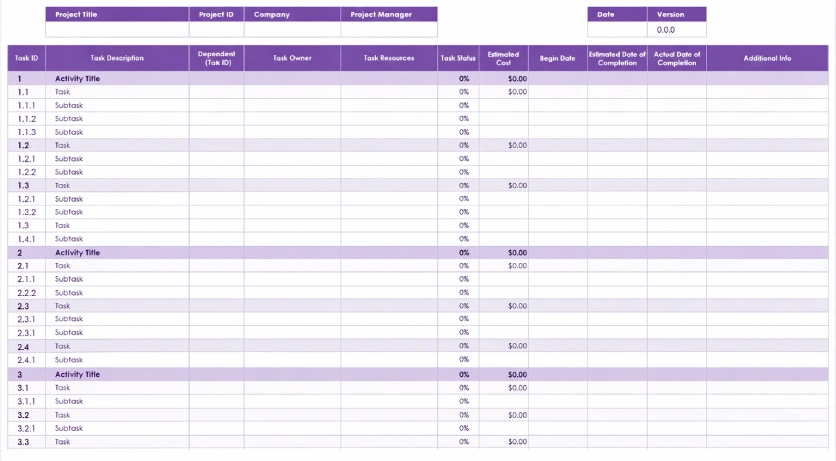
With these columns, your template serves both as a planning tool and as a tracking tool during execution.
Difference Between the WBS and the Project Schedule
This is, without a doubt, the most common confusion among project managers who are getting certified. Let’s clarify it once and for all:
The WBS defines the WHAT. It is a scope management tool it decomposes and documents all the work the project must produce. It has no dates, no durations, no sequences. It only says what needs to be delivered and to what extent.
The schedule defines the WHEN. It is a time management tool it takes the work packages from the WBS and converts them into sequenced activities with start dates, end dates, dependencies, and assigned resources. The Gantt chart is the most common visual representation of the schedule.
The relationship between both tools is sequential: the WBS is built first (what needs to be done) and then the schedule (when and how it’s done). Trying to build the schedule without a solid WBS is like trying to calculate a travel route without knowing your destination.
A typical mistake is adding operational activities to the WBS (“Send email to vendor,” “Schedule kick-off meeting”) instead of deliverables. Those actions are schedule tasks, not scope components.
Conclusion and Next Steps
Throughout this guide, you’ve seen why the work breakdown structure is far more than a diagram: it’s the tool that transforms an ambiguous scope into a concrete, assignable, and controllable plan. From the 100% Rule to the WBS Dictionary, every element has a purpose and a direct impact on project success.
If you have a clear scope, have decomposed the work correctly, and have documented each package with its acceptance criteria, you’ve solved the hardest part. The rest — schedule, budget, risk management — is built on that solid foundation.
Mastery of tools like the WBS is precisely what distinguishes a junior project manager from a senior one, and what is assessed in the most recognized certifications in the field. If you want to go a step further and demonstrate your competence officially, here are some resources to help you:
- Practice and measure your knowledge with the CAPM exam simulator, ideal if you are just starting your certification journey.
- If your profile is more oriented toward business analysis, the PMI-PBA certification will open doors to roles with greater responsibility.
Professional project management starts with the right tools. And the WBS is, without a doubt, one of the most powerful in your arsenal.