

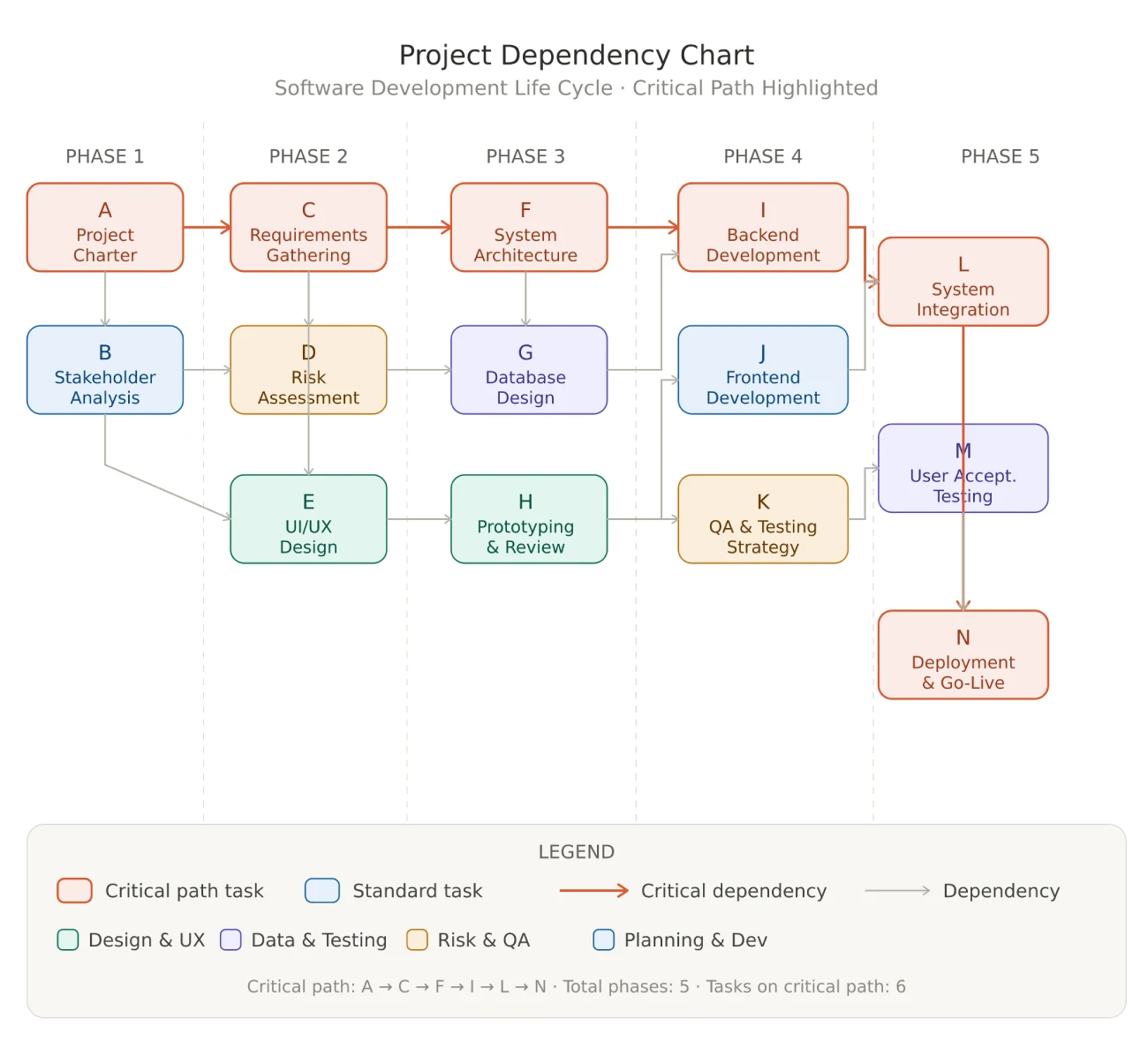
A Dependency Chart is a visual representation of the relationships between tasks or components within a project. It identifies predecessors and successors to ensure a logical workflow, allowing project managers to visualize the critical path and manage constraints effectively to prevent schedule delays.
In complex projects, clarity is the difference between on-time delivery and cascading failure. When dozens of tasks interlock across multiple teams, a single untracked dependency can stall an entire program. The dependency chart solves this problem by making every relationship visible, explicit, and actionable, turning abstract task lists into an interconnected roadmap your whole organization can navigate.
What is a dependency diagram?
A dependency diagram, also called a network diagram or precedence diagram, is a structured visual model that maps which project tasks must be completed before others can begin (or end). Each node in the diagram represents a task or deliverable; each arrow or edge encodes a logical constraint between two nodes.
Project dependency diagrams are a cornerstone of schedule development in the PMBOK® Guide (Eighth Edition). They feed directly into the critical path method (CPM), resource leveling, and risk identification, making them indispensable for any project manager handling work with complex interdependencies.
Unlike a simple to-do list or a Gantt bar chart, a dependency diagram exposes the why behind every sequence. Teams stop asking “why is Task 17 blocked?” and start seeing the answer at a glance.
Dependency graph vs. dependency chart: key differences
These two terms are often used interchangeably, but there is a meaningful distinction that reveals your level of expertise:
- Dependency Graph: A mathematical concept from graph theory. Nodes and directed edges represent components and their relationships in a formal, algorithmic sense. Used heavily in software engineering (package managers, build systems, compiler pipelines) and data science (DAGs in Apache Airflow, dbt lineage graphs).
- Dependency Chart: The project management adaptation of the graph concept. It layers business logic on top, with task names, durations, owners, milestone flags, and schedule constraints. Tools like Microsoft Project, Primavera P6, and Monday.com render dependency charts as interactive diagrams or Gantt-linked networks.
For a software architect mapping microservice call chains, the “dependency graph” framing is correct. For a project manager scheduling a product launch, the “dependency chart” or “project management dependencies template” is the right instrument.
What is the purpose of a dependency diagram?
The dependency diagram serves four strategic purposes that no spreadsheet or verbal briefing can replicate:
- Bottleneck identification: Visually surfacing tasks with many incoming dependencies, the nodes where delays accumulate and propagate downstream.
- Critical path visibility: The sequence of tasks with zero float determines the earliest possible project completion date. A dependency chart makes this path unmistakable.
- Risk management: External dependencies (third-party deliverables, regulatory approvals, vendor milestones) appear as explicit nodes, prompting proactive contingency planning.
- Schedule optimization: Identifying tasks that can run in parallel unlocks compression opportunities, compressing the schedule without adding scope or resources.
A 2025 Harvard Business Review study on visual dependency management found that project teams using network diagrams reduced unplanned delays by 28% compared to teams relying solely on task lists. The mechanism is simple: when people see the chain, they protect it.
The 4 essential dependency types in project management
The PMBOK® Guide defines four logical relationship types, collectively known as precedence diagramming method (PDM) relationships. Mastering all four is a prerequisite for the PMP® exam and for designing airtight project schedules.
| Type | Logic | Real-world example |
|---|---|---|
| Finish-to-Start (FS) | B cannot start until A finishes | Testing starts after coding ends |
| Start-to-Start (SS) | B cannot start until A starts | Documentation starts when development starts |
| Finish-to-Finish (FF) | B cannot finish until A finishes | QA sign-off and UAT end together |
| Start-to-Finish (SF) | B cannot finish until A starts | Shift handover: new shift starts before old shift ends |
Finish-to-Start (FS)
Finish-to-Start is the default dependency type, the one most project managers think of first. Task B cannot begin until Task A is fully complete. This is the most common relationship in waterfall and hybrid methodologies: requirements must finish before design starts; design must finish before development starts.
Real-world example: A construction project cannot begin framing (Task B) until the foundation pour has cured (Task A). No overlap is possible, as concrete physics enforces the dependency.
Start-to-Start (SS)
Start-to-Start enables parallel tasking. Task B can begin once Task A has started, not after it finishes. This is the engine of schedule compression: by identifying SS relationships, project managers can overlap work packages and shorten the critical path without increasing risk.
Real-world example: In a software release, the technical writing team can begin drafting release notes (Task B) as soon as feature development starts (Task A). Both activities run in parallel, saving days or weeks on the schedule.
Finish-to-Finish (FF)
Finish-to-Finish synchronizes outputs. Task B cannot finish until Task A finishes. This relationship is common when two activities must conclude together to maintain quality or compliance, since neither output is useful without the other being complete.
Real-world example: In a regulated pharmaceutical trial, patient data collection (Task A) and adverse event reporting (Task B) must both conclude simultaneously. Reporting cannot be finalized until data collection closes.
Start-to-Finish (SF)
Start-to-Finish is the rarest and most counterintuitive relationship. Task B cannot finish until Task A has started. It is most commonly encountered in just-in-time production and operational handover scenarios where the successor activity must remain active until the predecessor kicks in.
Real-world example: A hospital shift handover: the night shift (Task B) cannot officially end until the day shift (Task A) has begun. This prevents any gap in patient coverage, regardless of clock time.
PMP tip: SF dependencies are rarely tested in isolation but frequently appear in scenario-based exam questions. Understanding the shift-handover analogy is the most reliable way to recognize SF logic in disguise.
How to draw a dependency diagram: a 4-step guide
Building a dependency chart is a structured process. Skipping steps, particularly step 2, is the most common cause of diagrams that look professional but fail operationally.
Step 1: task listing
Begin with a complete Work Breakdown Structure (WBS). Every deliverable-level work package in your WBS becomes a candidate node in the dependency chart. Assign a unique ID to each task and record its estimated duration. Incomplete task inventories produce incomplete dependency charts, which is worse than no chart at all because they create false confidence.
Step 2: logic definition
For each task pair, determine the dependency type (FS, SS, FF, or SF) and identify whether the dependency is:
- Mandatory (hard logic): Physically or legally required, such as concrete before framing or regulatory approval before launch.
- Discretionary (soft logic): Best-practice sequencing that could be altered, typically used to manage risk or quality.
- External: Dependent on an entity outside the project team, such as vendor delivery, client sign-off, or permit issuance.
- Internal: Dependent on another task within the project team’s direct control.
This classification matters because mandatory dependencies are immovable constraints, while discretionary ones are schedule compression levers.
Step 3: tool selection
Choose your diagramming tool based on project complexity, team distribution, and integration requirements:
- Gliffy / Lucidchart: Best for visual, drag-and-drop dependency mapping. Ideal for stakeholder presentations and teams with varied technical backgrounds.
- Microsoft Project / Primavera P6: Enterprise-grade tools that auto-generate network diagrams from task data and calculate the critical path algorithmically.
- Mermaid.js: Open-source, code-native diagramming. Ideal for technical teams using GitOps, documentation-as-code, or CI/CD pipelines (see next section).
- Monday.com / Asana: Collaborative platforms with built-in dependency tracking and Gantt views, well-suited for agile or hybrid teams.
Step 4: connection mapping
With your tool selected and tasks entered, define each relationship using the logic determined in Step 2. Work left-to-right, from project start to project end. Validate the chart by tracing every path from the first node to the last and confirming that all constraints are logically sound. Run a forward and backward pass to calculate early/late start and finish dates, the foundation of critical path analysis.
Dependency management best practices
Dependency charts are living documents, not one-time deliverables. The following practices separate high-performing PMOs from teams that build charts once and forget them.
Critical path integration
Every dependency chart should be paired with a critical path analysis. The critical path is the longest sequence of tasks with zero float and it defines the immovable deadline floor. Any delay on a critical path task delays the project end date by an identical amount.
Best practice: color-code critical path tasks in your dependency chart (red is the PMBOK standard). Review the critical path at every status meeting. When scope changes occur, re-run the forward and backward pass immediately, since scope changes routinely shift which path is critical.
Automated risk detection via AI
Modern PMO platforms integrate machine learning models that flag at-risk dependencies before delays materialize. These systems analyze historical performance data, current task velocity, resource utilization, and external calendar events to assign a probability score to each dependency node.
When a dependency node crosses a risk threshold (typically 70%+ probability of delay), the system triggers an automated notification to the task owner and project manager. This moves dependency management from reactive (“the delay happened”) to predictive (“the delay is likely, act now”).
Even without an AI-powered platform, teams can approximate this capability manually by tagging external dependencies, assigning float buffers to high-risk paths, and scheduling weekly dependency review checkpoints.
Project management dependency templates & visual examples
Two visual formats dominate dependency documentation in professional project management:
Network diagram (Precedence Diagram Method)
The network diagram is the purest form of a dependency chart. Each task occupies a node (rectangular box) showing task ID, name, duration, early start (ES), early finish (EF), late start (LS), and late finish (LF). Arrows between nodes show the relationship type. The critical path is highlighted, and float is visually apparent from the gap between ES/LS values.
Network diagrams are the format of choice for PMP exam questions, CPM analysis, and formal schedule submissions to clients or sponsors. They are most effectively generated by scheduling tools that auto-calculate float and critical path values.
Alt Text for visual: “Project dependency chart example showing FS and SS relationships in a network diagram with critical path highlighted.”
Gantt chart with dependency arrows
The Gantt chart is the most widely recognized project schedule format. When dependency arrows are added, connecting the end of one bar to the start of the next, the Gantt effectively becomes a dependency chart in timeline form. This hybrid format is highly accessible to executive stakeholders who may be unfamiliar with network diagram notation.
In Microsoft Project, Primavera P6, and Monday.com, Gantt dependency arrows are automatically generated from the task logic entered in the schedule. Changing a dependency type instantly updates the arrow geometry.
Alt Text for visual: “Gantt chart with dependency arrows showing Finish-to-Start and Start-to-Start relationships across a 12-week project timeline.”
For teams seeking a ready-made starting point, a project management dependencies template should include: a task inventory table, a dependency type classification column, a node-based network diagram canvas, and a Gantt view with linked bars. These elements together constitute a complete project dependencies template suitable for any methodology, whether waterfall, hybrid, or agile at scale.
Frequently asked questions (FAQ)
What is the best tool for mapping project dependencies?
The answer depends on your team’s technical maturity and project complexity. For enterprise programs, Primavera P6 and Microsoft Project remain the gold standard as they auto-calculate critical path and integrate with ERP systems. For collaborative mid-market teams, Lucidchart and Monday.com offer the best balance of usability and feature depth. For technical teams operating in a GitOps or documentation-as-code environment, Mermaid.js is the clear choice: free, version-controlled, and AI-compatible. The ideal setup for most organizations is a two-layer approach, with Mermaid for rapid prototyping and documentation, and a scheduling platform for formal schedule management.
How do you track and resolve resource conflicts in a dependency chart?
Resource conflicts arise when two or more tasks with a shared dependency are assigned to the same resource at the same time. The dependency chart identifies the tasks, and resource leveling resolves the conflict. In practice: (1) run a resource histogram to find over-allocation peaks, (2) identify which of the conflicting tasks has float, (3) delay the task with float until the resource is available. If both tasks are on the critical path with zero float, you must either add resources, reduce scope, or accept a schedule extension. AI-powered PMO platforms can automate steps 1 and 2, dramatically accelerating the resolution process.
What is the difference between internal and external dependencies?
Internal dependencies connect tasks that are both within the project team’s direct control. External dependencies connect a project task to a deliverable or milestone owned by a party outside the team, such as a vendor, regulatory body, client, or parallel project. The critical distinction is risk exposure: internal dependencies can be managed directly, while external dependencies require active relationship management, contractual SLAs, and contingency buffers. On your dependency chart, mark external dependencies with a distinct color or icon so they receive heightened monitoring attention throughout the project lifecycle.
How does a dependency chart differ from a WBS?
A Work Breakdown Structure (WBS) answers the question “What needs to be done?” as it decomposes project scope into deliverables hierarchically. A dependency chart answers “In what order?” as it sequences the WBS work packages according to logical constraints. The two tools are complementary: you build the WBS first to inventory all work, then build the dependency chart to sequence that work. Neither substitutes for the other.
Start mapping your dependencies today
A well-built dependency chart is one of the highest-leverage investments a project manager can make. It transforms an unmanageable tangle of tasks into a clear, navigable network, where every team member understands not just what they own, but why the timing of their work matters to everyone downstream.
Whether you are preparing for the PMP® exam, architecting a complex IT transformation, or leading a multi-team product launch, the dependency chart is your single source of truth for schedule logic. Start with the 4-step guide in this article, validate your dependency types against the FS/SS/FF/SF framework, and version-control your charts using Mermaid.js for maximum transparency and maintainability.
Ready to put this knowledge into practice? Explore our PMP Certification Training resources and PMP Exam Test Simulator to master dependency management and critical path analysis for the PMP® exam.
References & Further Reading
- Project Management Institute (2026). PMBOK® Guide – Eighth Edition Standards for Dependency Mapping
- Mermaid.js Documentation (2026). Generating Dependency Graphs via Syntax
- Harvard Business Review (2025). The Impact of Visual Dependency Management on Project ROI







2 thoughts on “Dependency Chart: Types & How to Draw One”
I have been struggling with this issue for a while and your post has provided me with much-needed guidance and clarity Thank you so much
You’re welcome! I’m so glad it brought you some clarity.